Showing posts with label mobile. Show all posts

Wednesday, 14 June 2017

Progressive web sites: a future that’s native to the web

People sometimes claim that the web and native apps are converging. I disagree. I think the process is more like chiasmus in the sense that we will end up with an app-like web and a web-like app ecosystem but they'll still be different from each other. The two ecosystems will cross over but the results will have surprising new capabilities and unlock new metaphors for thinking about them.

In the meantime we are stuck in an uncanny valley where a lot of the PWAs people know are designed like Android apps rather than trying to be native to the web. One of my colleagues even wrote an article arguing that you should "start by forgetting everything you know about conventional web design, and instead imagine you’re actually designing a native app."

I think we can do better but first we have to imagine a future for the web that isn't just about building native apps in Javascript. This requires a conceptual model that’s native to the web.

That conceptual model would assume that people aren't going to arrive at your home page. Instead they'll find your site through search or social which deeplink to a specific page and they won't know if your site is valuable yet. That means they won't be immediately interested in adding your site to their home screen or giving you access to device capabilities (like notifications or location) or waiting whilst a massive Javascript bundle downloads.

That conceptual model would focus on the uniquely universal reach of the web rather than just what's possible on high-end mobile devices. That's because the first time the user visits your site may be on a desktop and if they get a bad experience they're not going to click on links to your site when they turn up in search results or in a social media context. Even if the first visit happens on a mobile device it may be a low end device or on a flakey network so if they get a bad experience there they definitely won't return in other contexts.
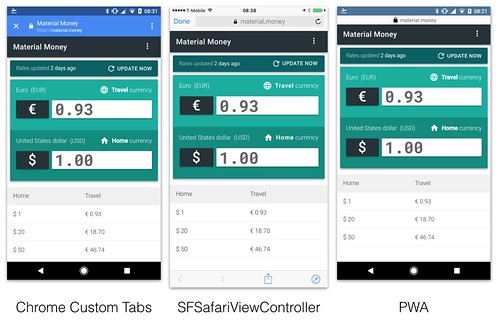
That conceptual model would emphasise URLs, linking to other people's sites and reusing rather than reinventing browser features. For example native apps get Chrome Custom Tabs or SFSafariViewController which are great experiences that encourage linking to the rest of the web. Consequently their developers don’t have to worry about harming retention metrics because it's just one click to get back. But we don't yet have the equivalent for PWAs.
Different contexts for viewing web pages
So, what do we call this new model? I think Jeremy Keith was right when he coined the phrase Progressive Web Sites because I believe that the best thing about PWAs is that they are part of the web. The trick is that they need to be good websites. This means that a good PWS should:
  • use the PRPL pattern to ensure the fastest possible initial experience.
  • take advantage of PWA techniques and technologies to give the user the best possible experience.
  • be responsive so that any user on any device can access the site and get a good experience.
  • be progressively enhanced because the set of capabilities that will be available on the user's device are unknowable.
  • link liberally and rely on the browser to provide features like sharing, window management and navigation.
  • default to web-like design tropes and only make the effort to be app-like when it provides a clear benefit.
  • focus on their own branding (whilst still being responsive to the constraints of the user's context) rather than trying to fit into any given operating system's guidelines.
In conclusion I think that most people should be building web-like websites rather than app-like websites. That's because few sites are compelling enough that people will benefit from having instant access via their home screen. If you're Twitter.com then a PWA is the right choice because millions of people want your icon on their homescreen, will launch it every day and want to use device capabilities (like the camera or notifications). However if you're Oshineye.com then a PWS makes much more sense because even I don't want it on my homescreen. Don't think of this as a binary choice. Instead it's a spectrum and you should choose your place on it based on:
  • the nature of your traffic. If you depend on traffic from external links, have high bounce rates and low session-depth then you should be leaning towards PWS. If you have lots of direct traffic, low bounce rates and high session-depth then you should be leaning towards a PWA. 
  • the amount of resources you're willing to invest. The less resource-constrained you are the more you should skew towards a PWA.
  • the incremental ROI: If your incremental ROI is small then it doesn't make sense to invest a lot. Given that a PWA is a bigger investment than a PWS you should default to PWS and only make the extra investment to build a PWA if you can clearly articulate the additional benefits you'll get from it.

Wednesday, 20 July 2016

Art, AI and Google I/O 2016

What if there are interesting things waiting to be discovered where artificial intelligence meets art?

At Google I/O 2016 Ramzi Rizk told me there's a field called Computational Aesthetics. It is so nascent that it doesn't even have a Wikipedia page. Computational Aesthetics is where computers can actually tell us if a picture is pretty or not. This is different from systems like Flickr's Interestingness because the system infers beauty from the image itself rather than from the social signals generated by people's interactions with the image. In fact there's already been research showing that social signals lead communities like Flickr to overlook hidden gems. This research raises the tantalising possibility that there may be large numbers of overlooked masterpieces hiding in the historical corpus of art.

I find this intersection of art and machine learning interesting because at scale it leads to the discovery of new tools and new perspectives on something that we consider to be uniquely human. For example the spatial visualisation used in the "Machine learning & art" talk at I/O lead me to t-SNE as a mechanism for building two-dimensional maps of high-dimensional spaces.

This raises the possibility of building pirate maps of information spaces or hypertexts and connecting that to Vannevar Bush's ideas about stigmergy in the Memex. Imagine being able to create and share your own trail through the space of all art? Or being able to reinvent the idea of the traditional slideshow of the family's holiday photos.


Today apps like Prisma merely help us make alternative versions of existing photos. At the same time apps like The Roll and Google Photos help us identify our best photos. In the future they might help photographers to create photos from scratch and tell new kinds of hypertextual stories.

A photo posted by Ade Oshineye (@ade_oshineye) on

Friday, 19 June 2015

Omnivorous inclusiveness and the closing of the browser parenthesis

In the past I've thought of the web as a convoy of browsers. That turns out to be wrong.

Nowadays (thanks to a long lunch with Paul Downey, Jeni Tennison,  et al) I've begun thinking of the web as a ship of Theseus where, despite replacing every single part of the stack, what's left is still recognisably the web.

This made me realise that we are surrounded by unexamined and ossified metaphors that are in danger of becoming thought-terminating cliches. For example:
- open web versus (presumably) closed web
- the web browser is the web platform is the web
- the web as a platform
- web apps
- web versus native

One of the reasons I present at conferences like OpenTech is because I want to have my mind changed and my complacent metaphors jolted. This year my presentation came out of asking myself "what do I most like about the web?" My initial list was:
- its universality (view source meant everybody everywhere could cut and paste their way to something that sort of worked).
- its omnivorous inclusiveness (it tended to absorb neighbouring or competing technologies like WAIS, Gopher, NNTP and FTP).
- its hypertextuality, intertwingularity and document orientation because they open the door to new forms of argumentation as well as letting us create living documents.
- its peculiar notion of addressability without guarantees about the nature of the resources at the end of the links.

This presentation started out as my oft-repeated but never documented "HTML 3.2 was the last good version of HTML" rant. It channeled some of my distress with the ideas behind HTML 5 and the notion that there is a "web platform" which arbitrarily excludes certain technologies (like Flash and native apps) but includes others (like JavaScript). In its final form it asked if today's open web platform is still the web. Now I have my answer.

That answer is driven by two realisations. Firstly it turns out that browsers are not the only user agent. They're not even the only kind of user agent. Secondly now that deeplinking is becoming mere linking it is clearer than ever that apps are just domain-specific user-agents. As a consequence it becomes clear that native versus web is merely a debate about whether we should use 1 universal user-agent or N domain-specific user-agents.

Since browsers and native apps are merely different kinds of user-agents I think it's a mistake to conflate browsers and the web. I think we run the risk of mistaking the capabilities and roadmap of today's most popular kind of user agent for the capabilities and roadmap of the web. For example user-agents that don't support Javascript or CSS are equally legitimate but less popular constituents of the web. However there's a strong temptation to consider them to be obsolete or lagging members of our convoy and thus leave them behind.

So.

The web has changed, is changing and will keep on changing. The convoy is bigger than I originally thought because there are lots of overlooked user-agents out there. These apps aren't part of the web any more than browsers are but their addressable/linkable content most definitely is part of the web. Just because that content has a preferred user-agent doesn't change this.

Perhaps, like the Gutenberg Parenthesis, there is a 'Browser Parenthesis' that is also closing?


Update: The audio from my OpenTech 2015 talk is now available.

Friday, 2 January 2015

2015 technology wishlist

The start of the year is a good time to be thinking about the end of the year and the kind of world I would like to see. Usually this leads to resolutions and predictions. Unfortunately I find most predictions worthless since the pundits seldom go back to check on their previous predictions. The other problem is that people start out making predictions and then the articles turn into wishlists. That's why this year I'm just going to write a wishlist.

I'd like to see:
  • more viable identity providers.
  • more social environments that understand the benefits of Reed's Law and ridiculously easy group-forming.
  • Wikipedia starting to use identity technology to improve the user experience. For example if I donate or become a member then I'd like to stop seeing obnoxious adverts (and they really are adverts) asking for money. The Guardian's membership programme is a good model that Wikipedia should adopt.
  • a viable successor to the Leica M9. The Leica M Type 240 just isn't a big enough improvement.
  • a viable replacement for Aperture. I have zero faith in the upcoming Apple Photos app and there isn't enough official  support for migrating from Aperture to Lightroom.
  • a viable replacement for the old Mac Pro. The new Mac Pro abandons all of the strengths of the old Mac Pro.
  • more mujicomp and less ryanaircomp.
  • fewer people bemoaning the web we lost and more people asking new questions about the world we actually live in where everything gets touched by the network.
  • more device-native apps. I'd like to see more apps that are designed to really exploit the capabilities of our current generation of interconnected mobile devices.
  • more apps that provide multi-device workflows
  • more experience reports about the issues involved in building backend services that support multiple native mobile and web apps.
  • the Software Craftsmanship community changing its focus from converting new people to helping each other learn and grow.
  • less hype/advocacy for microservices and more documentation/descriptions of techniques that work with collections of small services. You'll be able to tell if you're seeing hype by the number of awkward questions that they raise.

Wednesday, 24 December 2014

What makes native mobile apps special?

That tweet was inspired by a conversation with Scott Jenson in which he asked: "what is mobile good at?" My response was: "anything that gets better if you can do it everywhere and add new sensors or transmitters."

I think I now have a better answer to a slightly different but more evocative question: what makes native mobile apps special?

Firstly these apps are special because they can use every sensor and transmitter on your mobile phone. That means they will also be the first to get access to new sensors and transmitters as they are added to these devices. This gives them more power than any other apps that have ever existed.

Secondly these apps are special because they're installed in a device that the user will carry around all day every day. That means that they will see more usage per user since there will be so many more opportunities to use them. It may even be time to start measuring average usage per user (AUPU) as a more quantitative version of Larry Page's 'toothbrush test.'

Finally these apps are special because they're on devices that will eventually end up in the hands of every post-pubescent person on the planet. That means they will eventually end up with more users than anything we've seen so far.

In short...ubiquity.


Saturday, 21 December 2013

What is the state of the art in Android sharing?


I meet a lot of people in my job. Consequently I get to see lots of different companies trying to create the best possible Android sharing experience. Just about all of them start off with the standard sharing system based on intents and the standard chooser dialog.

It's compatible with just about all devices but it gives users an alphabetical list of applications even though many of these may not make sense in the given context. For example the list below shows the stock Email app even though I'm a Gmail user who has never configured the other email app on my tablet. This dialog also has issues for users who install lots of apps and its alphabetical ordering means we're starting to see developers gaming the system in order to be at the top of the list.
There's also the problem that the intents system doesn't let you customise the recipient other than by passing in a set of key-value pairs so developers (like The Guardian and Soundwave) offer an explicit Google+ share button in the action bar for users who are signed-in with Google+. This gives their users direct access to interactive posts. They also offer the standard chooser dialog as well.

The Gallery and Keep apps try to remember the last N apps the user has shared and present them to the user by using the ShareActionProvider added in Ice Cream Sandwich. Shazam's implementation is built on the same idea but does something slightly more sophisticated with it. It shows a list of the apps I've recently shared content to but adds various social services to the top of the list. It also knows which social service I signed-in with and adds it to the action bar as a separate button. The assumption is that I'm more likely to want to share newly discovered music to that social network than with the random assortment of apps on my device.


Snapette and Fancy implement simpler variants on the same idea. They hardcode a small set of social services (including Google+, Twitter and Facebook) even if they're not installed on the user's device. Clicking on those options takes users to a sign-in dialog before they can share. In their defence Fancy does offer a 'More' button that goes to the standard chooser dialog. This offers an escape hatch for users who want to share to contexts other than social networks.


Another alternative can be seen in the Spotify app. They make their own version of the standard chooser dialog but add a Spotify button to the top. That's because the standard chooser dialog doesn't give you much control over the order or the membership of the list it uses.

Unfortunately if you make your own chooser dialog you're going to have to expend a lot of effort to make it resemble the real thing. Or you can just show a simple list.


So what do I recommend? Ideally you should use the ShareActionProvider but nowadays a lot of apps are finding that deep integration with social services drives significant traffic and engagement. In that case...

If the screen is large enough then you should have your preferred share option in the action bar next to a button that launches a custom share list that shows your preferred apps with a More button that sends the user to the standard share dialog. This pushes users towards the developer's preferred networks (these could be the app's network or the services that the user has used to sign-in) but still gives users a way to get to all of apps they've installed.

On smaller screens you should have a share button that sends the user to a custom list containing the developer's preferred networks with a More button that sends users to the standard chooser dialog.

This approach balances simplicity of implementation, predictability (users shouldn't have to wonder why options are appearing and disappearing from their chooser dialog), extensibility, value to the developer and responsiveness to device size. This may seem complicated but fortunately a large amount of this can be implemented using the ShareActionProvider and its support for fine-grained tracking of history.

This is a complex and subtle topic with many different approaches being explored by lots of very smart people. I'm not going to pretend that this blog post is the final answer. After all, there's always the option of building something completely specific to your needs.

Monday, 7 October 2013

The screens in our future

Through historical accident, television has come to be seen as the first screen with our mobile devices as the second screen. This implies a mental model that's usually driven by television people who really mean that television is the primary screen whilst all others are merely secondary screens. When these devices are viewed from the perspective of the programme makers that is correct. But things change if we look at them from the perspective of the user.

When we look at usage it becomes clear that mobile devices (currently just phones and tablets) are the primary screen whilst television and desktop computers are the secondary screens.
Mobile is my screen.
Tablet is our screen.
TV is their screen.
-- Simon Davies and Ade Oshineye
The above quote is a synthesis of points made by Simon Davies and Ade Oshineye during an Internet Week panel discussion. They reflect a way of looking at screens/devices that may have surprising amounts of explanatory power.

The mobile (phone) screen is the most personal screen. It tends to belong to one person who carries it everywhere and seldom shares it. That person will customise it with a combination of apps and bookmarks that's practically a fingerprint. 

The tablet is large enough to be viewed by multiple people and is often shared within a family. As such it accumulates layers of choices from all the people who have used it. However it still tends to feel like a device that belongs to a small set of people. Whilst both of these devices empower people by giving them control over usage and content, the television is different. 

Whilst it may belong to one or many you're never allowed to forget that the content on your television is decided by other people. They decide what you can watch and when you can watch it. As for customisation…forget it.

The final step is to realise that we shouldn't be thinking about a fixed number of screens. We're facing a multi-screen future. That means there are going to be N categories of M screens in your life. And the values of N and M will only increase over time.

This is not a problem we will solve by building responsive websites with a fixed number of breakpoints. This is not a even problem we will solve by pouring the same content into a fixed number of buckets or screen sizes.

This is a Cambrian Explosion of contexts, interactions between contexts and user journeys across contexts. Time to adapt.

Plenty of room for more screens